SD-WAN’s core capabilities:
- multi-path control
- application awareness
- resultant dynamic application steering
Starting in FortiOS 7.2.1, the entire application category from FortiGuard can be selected as a destination in the SD-WAN service rule. Previously, only application groups and individual applications could be selected.
Fortinet Secure SD-WAN components:
- FortiGate NGFW, which runs FortiOS, is the core of Secure SD-WAN
- Fortinet ZTNA Access Proxy, which runs natively in FortiOS, starting in FortiOS 7.0
- FortiManager for the orchestration and management plane
- FortiAnalyzer for advanced analytics and automation
- FortiPortal to provide a scalable and flexible customer self-service portal
Fortinet Secure SD-WAN solution can be extended to Secure SD-Branch. SD-Branch components:
- FortiSwitch
- FortiAP
- FortiFex
SD-WAN configuration
SD-WAN interface members
Can include underlays or overlays
For convenience, the SD-WAN members are grouped into SD-WAN zones.
Can include underlays or overlays
For convenience, the SD-WAN members are grouped into SD-WAN zones.
Performance SLA
Health-check probes (including Ping, HTTP, TCP/UDP Echo, TWAMP, or DNS)
Each probe will measure latency, jitter, and packet loss percentage
Each probe will measure latency, jitter, and packet loss percentage
SD-WAN rules
SD-WAN routing logic
- SD-WAN rules are matched only if the best route to the destination points to SD-WAN.
The best route to the destination must point to any SD-WAN Member—not necessarily the one selected to forward the traffic. - SD-WAN member is selected only if it has a route to the destination.
This does not have to be the best route
SD-WAN Strategy
FortiOS7.2
- Best Quality—select an SD-WAN member with the best measured quality.
- Lowest Cost (SLA)—select the cheapest SD-WAN member that meets a given SLA target.
- Maximize Bandwidth (SLA)—load-balance across all SD-WAN members that meet a given SLA target.
- Manual—manually specify an SD-WAN member to select.
FortiOS 7.4 and later:
- Manual
- Best quality
Requires Measured SLA, the interface with the best measured performance is selected.

FGT-76-A # dia sys sdwan service4
Service(1): Address Mode(IPV4) flags=0x4204 dst-negate use-shortcut-sla use-shortcut
Tie break: cfg
Shortcut priority: 2
Gen(1), TOS(0x0/0x0), Protocol(0): src(1->65535):dst(1->65535), Mode(priority), link-cost-factor(latency), link-cost-threshold(10), heath-check(Default_DNS)
Members(2):
1: Seq_num(1 port1 virtual-wan-link), alive, latency: 40.750, selected
2: Seq_num(2 port2 virtual-wan-link), alive, latency: 45.565, selected
Src address(1):
10.0.1.0-10.0.1.255
Dst address(3):
192.168.0.0-192.168.255.255
172.16.0.0-172.31.255.255
10.0.0.0-10.255.255.255
FGT-76-A #
Because quality criteria is Latency, so port1 is selected, but it is not marked in CLI.
- Lowest cost (SLA)
with Load Balancing option
requires SLA Target, the interface that meets SLA targets is selected.

When costs are same and load balancing ON.

FGT-76-A # dia sys sdwan service4
Service(1): Address Mode(IPV4) flags=0x24204 dst-negate use-shortcut-sla use-shortcut load-balance
Tie break: cfg
Shortcut priority: 2
Gen(1), TOS(0x0/0x0), Protocol(0): src(1->65535):dst(1->65535), Mode(sla hash-mode=round-robin)
Members(2):
1: Seq_num(1 port1 virtual-wan-link), alive, sla(0x1), gid(2), num of pass(1), selected
2: Seq_num(2 port2 virtual-wan-link), alive, sla(0x1), gid(2), num of pass(1), selected
Src address(1):
10.0.1.0-10.0.1.255
Dst address(3):
192.168.0.0-192.168.255.255
172.16.0.0-172.31.255.255
10.0.0.0-10.255.255.255
FGT-76-A #
SD-WAN routing logic
- SD-WAN rules are matched only if the best route to the destination points to SD-WAN.
- SD-WAN member is selected only if it has a route to the destination.
This does not have to be the best route this time!

- Our dynamic tunneling technology—Auto-Discovery VPN (ADVPN)—automatically builds direct IPsec tunnels between the sites willing to communicate. These tunnels (also called shortcuts) immediately become part of the overlay topology of your SD-WAN solution. And once the communication between the sites is over, these shortcuts can be automatically torn down to free up the resources.
- We also use industry-standard dynamic routing protocols (BGP being a typical choice), to exchange currently available paths between sites, automatically adapting to all topology changes.
the duty to steer the traffic in our solution is delegated to the fifth pillar—the SD-WAN. Therefore, it is (generally) not recommended to apply any route policy techniques to the routes learned via BGP. Rather than selecting a single best route, we would like to end up with equal-cost multi-path (ECMP) routes to all remote sites via all available overlays
When using FortiManager

hubs generally do not require SD-WAN configuration since they do not act as originating sites for traffic. They must only respect the steering decisions made by other sites in both directions.
FortiOS 7.2.4 and later includes a Fabric Overlay Orchestrator that simplifies deployments of SD-WAN regions where FortiManager is not required
Fabric Overlay Orchestrator is built into FortiOS, allowing devices inside the Security Fabric to automatically interconnect and self-form a new SD-WAN region
Enable Security Fabric as a root to see menu VPN > Fabric Overlay Orchestrator
.
=======SDWAN for DIA========================
1. Configure WAN interface IP addresses, remove all other interface related configurations, ref should shows "0".
2. There is a default SDWAN zone called "virtual-wan-link" (older version called SD-WAN interface), navigate to Network > SD-WAN Zones , Create New > SDWAN Member
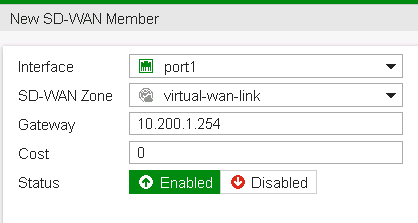

Verification:
Network > SD-WAN Zones

Verification:
Network > Interfaces

2. (optional) SDWAN load balancing mode
Branch1 # config sys sdwan
Branch1 (sdwan) # set load-balance-mode
source-ip-based Source IP load balancing. All traffic from a source IP is sent to the same interface.
weight-based Weight-based load balancing. Interfaces with higher weights have higher priority and get more traffic.
usage-based Usage-based load balancing. All traffic is sent to the first interface on the list. When the bandwidth on that interface exceeds the spill-over limit new traffic is sent to the next interface.
source-dest-ip-based Source and destination IP load balancing. All traffic from a source IP to a destination IP is sent to the same interface.
measured-volume-based Volume-based load balancing. Traffic is load balanced based on traffic volume (in bytes). More traffic is sent to interfaces with higher volume ratios.
SD-WAN Implicit Rules
3. Set default route using SD-WAN interface.

4. Add firewall policy

5. Verify routing:
Local-FortiGate # get router info routing-table all
...
Routing table for VRF=0
S* 0.0.0.0/0 [1/0] via 10.200.1.254, port1
[1/0] via 10.200.2.254, port2
C 10.0.1.0/24 is directly connected, port3
Dashboard > Network > Routing

6. Create SD-WAN rules
Also need set Interface Preference.
7. Performance SLA
Create or pickup a pre-defined SLA, assign it SD-WAN members
Set target server and the protocol used to probe the server
For Lowest Cost and Maximize Bandwidth SD-WAN rules, SLA Target is required.

===============
- WAN Remediation (Packet loss correction): There are situations were protecting the application from packet loss is crucial to business continuity. WAN remediation refers to a series of techniques to fix packet loss on a WAN link. Forward Error Correction (FEC) and Packet Duplication are WAN remediation techniques that can be used to protect a link from various types of impairments.
=========================
ibgp multipath enable
inject ECMP routes into local routing table
ibgp addtional-path enable
advertise multiple ECMP routes to BGP peers, when Disabled, only one best route is advertised
When there are multiple ECMP routes to a BGP next hop, all of them are considered for the next hop recursive resolution. This ensures that the outgoing traffic can be load balanced.
By default, BGP routes are not considered when a BGP next hop requires recursive resolution. They are considered when
recursive-next-hop is enabled. Recursive resolution will resolve to one level.To configure the ECMP algorithm from the CLI:
- At the VDOM-level:
config system settings
set v4-ecmp-mode {source-ip-based* | weight-based | usage-based | source-dest-ip-based}
end
- If SD-WAN is enabled, the above option is not available and ECMP is configured under the SD-WAN settings:
config system sdwan
set sdwan enable
set load-balance-mode {source-ip-based* | weight-based | usage-based | source-dest-ip-based | measured-volume-based}
end
===========
SDWAN Passive Probe
In passive mode, session information captured by firewall policies is used to determine latency, jitter, and packet loss. This has the added benefit of not generating additional traffic, and does not require the performance SLA to define a specific server for measurement. Instead, the SD-WAN rule must define the traffic to evaluate, and the firewall policy permitting the traffic must have a setting enabled.
1. Create the Passive Probe (Performance SLA)

2, Enable the Passive probe in the firewall rule:

3. Use the Passive Probe in SDWAN rule

=============SDWAN-7.4=============


Branch1 # di sys sdwan service
Service(1): Address Mode(IPV4) flags=0x4200 use-shortcut-sla use-shortcut
Tie break: cfg
Gen(2), TOS(0x0/0x0), Protocol(0): src(1->65535):dst(1->65535), Mode(priority), link-cost-factor(latency), link-cost-threshold(10), heath-check(Internet)
Members(2):
1: Seq_num(1 port1 WAN1), alive, latency: 10.136, selected
2: Seq_num(2 port2 WAN2), alive, latency: 15.173, selected
Internet Service(6): Godaddy(4294836970,0,0,0,0 36660) Dropbox(4294836727,0,0,0,0 17459) Salesforce(4294837976,0,0,0,0 16920) GoToMeeting(4294836966,0,0,0,0 16354) WebEx(4294838386,0,0,0,0 16350) Skype(4294838051,0,0,0,0 10)
Src address(1):
10.1.1.0-10.1.1.255
Service(2): Address Mode(IPV4) flags=0x4200 use-shortcut-sla use-shortcut
Tie break: cfg
Gen(2), TOS(0x0/0x0), Protocol(0): src(1->65535):dst(1->65535), Mode(sla), sla-compare-order
Members(2):
1: Seq_num(2 port2 WAN2), alive, sla(0x1), gid(0), cfg_order(0), local cost(0), selected
2: Seq_num(1 port1 WAN1), alive, sla(0x1), gid(0), cfg_order(1), local cost(0), selected
Internet Service(3): Gmail(4294836957,0,0,0,0 15817) Paypal(4294837705,0,0,0,0 29081) Alibaba(4294836336,0,0,0,0 16491)
Src address(1):
10.1.1.0-10.1.1.255
Service(3): Address Mode(IPV4) flags=0x4600 passive-measure use-shortcut-sla use-shortcut
Tie break: cfg
Gen(2), TOS(0x0/0x0), Protocol(0): src(1->65535):dst(1->65535), Mode(sla), sla-compare-order
Members(2):
1: Seq_num(2 port2 WAN2), alive, sla(0x1), gid(0), cfg_order(0), local cost(0), selected
2: Seq_num(1 port1 WAN1), alive, sla(0x1), gid(0), cfg_order(1), local cost(0), selected
Internet Service(3): YouTube(4294838537,0,0,0,0 31077) Pinterest(4294837728,0,0,0,0 31349) Facebook(4294836806,0,0,0,0 15832)
Src address(1):
10.1.1.0-10.1.1.255
Branch1 #
Comments
Post a Comment